Build messaging into
anything.
Everything you need to connect your application to LANA SMS. Generate an API key, make a simple POST request, and start sending reliable SMS from your own system.
Up and running quickly
The basic integration flow is intentionally simple.
Get your API key
Open your LANA SMS dashboard and create or copy an API key.
Send POST data
Pass phone and message as regular POST parameters.
Read the response
The API returns a JSON response containing the result and remaining balance.
Authentication
Every protected request uses your API key as a Bearer token.
Authorization: Bearer YOUR_API_KEY
Generating and managing API Keys
Your API key is created and managed directly from your LANA SMS account.
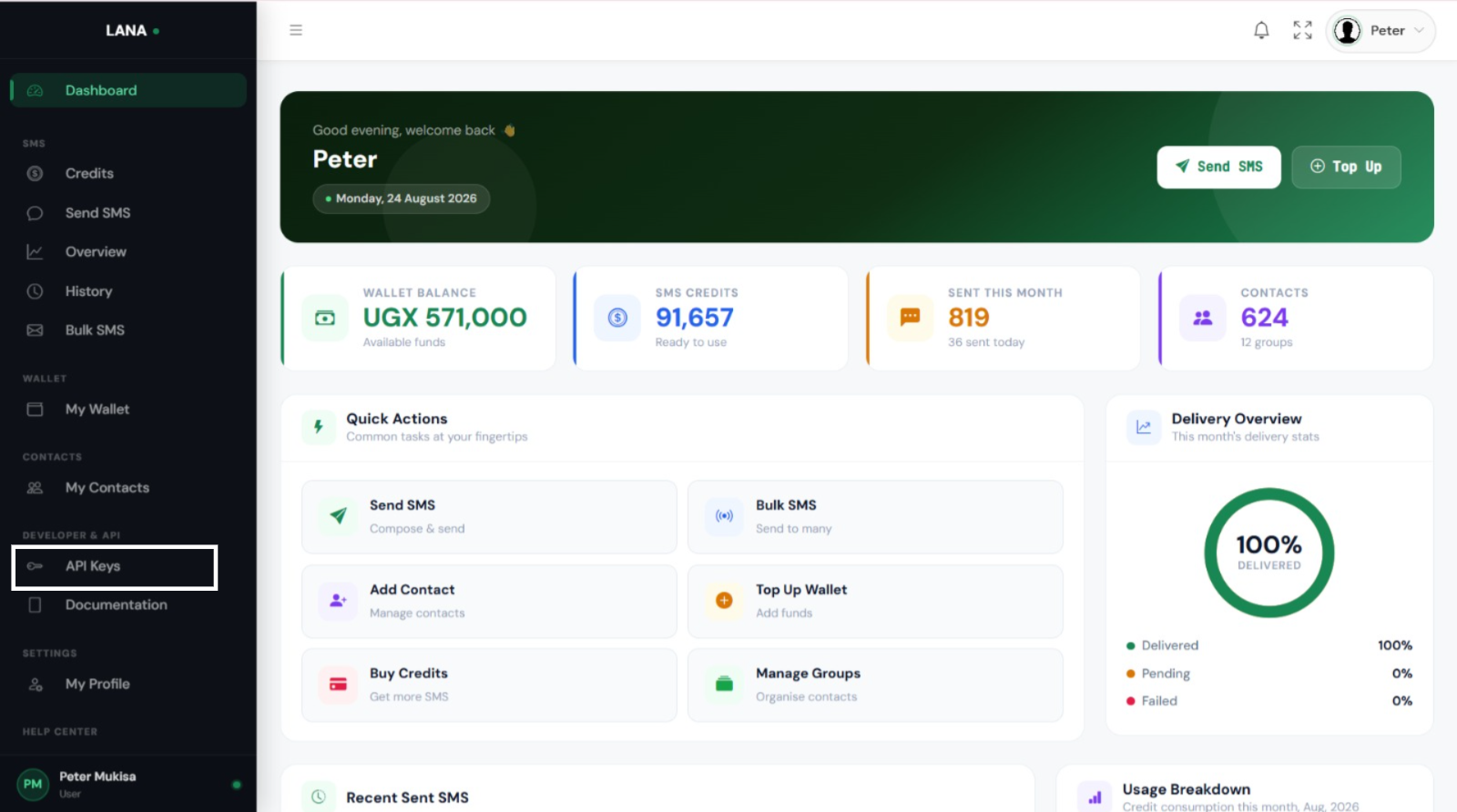
Open Developer & API
From the side navigation in your LANA SMS dashboard, select Developer & API.
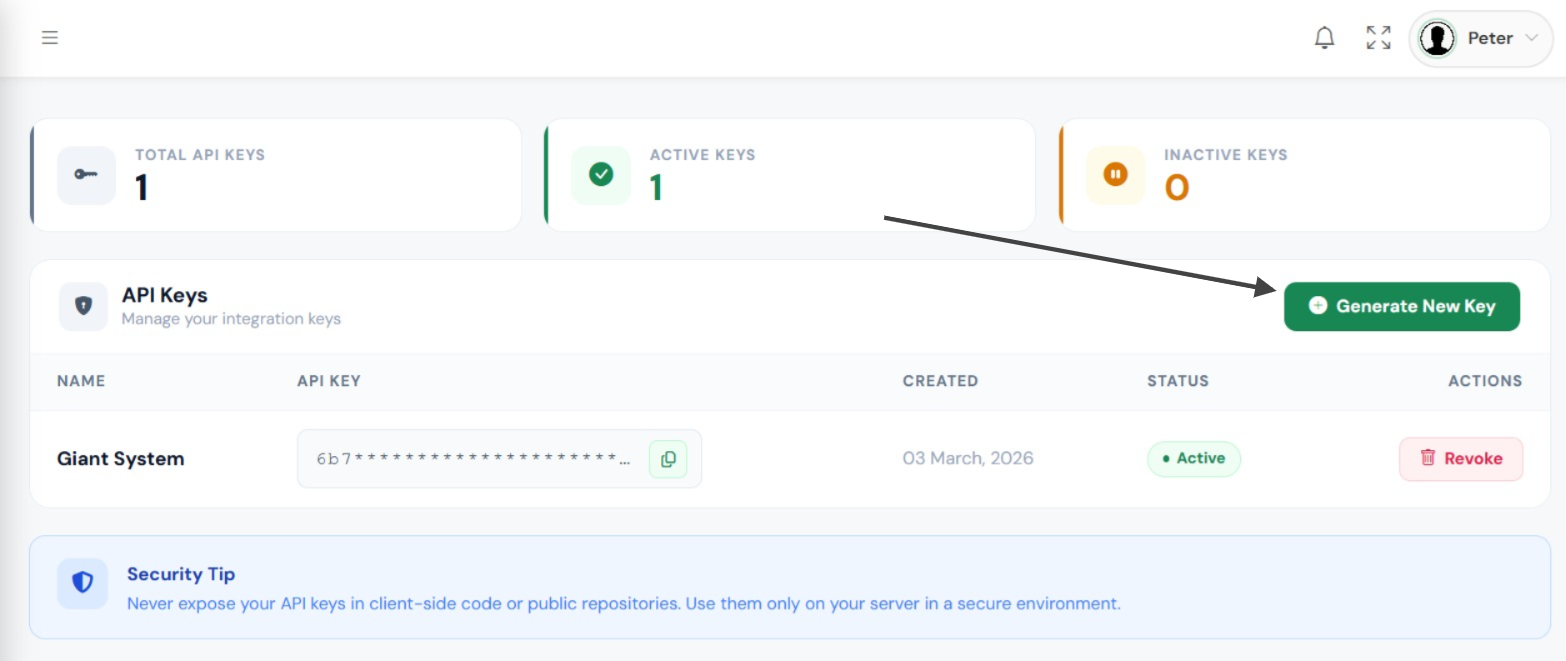
Open API Keys
Select API Keys to view keys already associated with your account.
Copy or generate
Copy an existing key, or click Generate New API Key to create another one.
Send SMS
Send one SMS or send the same message to multiple recipients.
phone and message as regular POST parameters.| Parameter | Required | Description |
|---|---|---|
phone | Yes | A recipient phone number. For multiple recipients, separate phone numbers with commas: 256700000000,256712345678 |
message | Yes | The SMS content to send. |
Integration examples
All examples below submit standard POST parameters.
curl -X POST "https://api.lanasms.com/v1/send" \
  -H "Authorization: Bearer YOUR_API_KEY" \
  -d "phone=256700000000" \
  -d "message=Hello from LANA SMS!"
$ch = curl_init('https://api.lanasms.com/v1/send');

curl_setopt_array($ch, [
  CURLOPT_POST => true,
  CURLOPT_RETURNTRANSFER => true,
  CURLOPT_HTTPHEADER => [
    'Authorization: Bearer YOUR_API_KEY'
  ],
  CURLOPT_POSTFIELDS => [
    'phone' => '256700000000',
    'message' => 'Hello from LANA SMS!'
  ]
]);

$response = curl_exec($ch);
$data = json_decode($response, true);const form = new URLSearchParams();
form.append('phone', '256700000000');
form.append('message', 'Hello from LANA SMS!');
const response = await fetch(
'https://api.lanasms.com/v1/send',
{
method: 'POST',
headers: {
Authorization: 'Bearer YOUR_API_KEY'
},
body: form
}
);
const data = await response.json();import requests
response = requests.post(
'https://api.lanasms.com/v1/send',
headers={
'Authorization': 'Bearer YOUR_API_KEY'
},
data={
'phone': '256700000000',
'message': 'Hello from LANA SMS!'
}
)
data = response.json()Send SMS responses
Responses are returned as JSON.
{
  "status": false,
  "message": "No phone number provided."
}{
"status": false,
"message": "No message provided."
}{
"status": "success",
"message": "Message sent successfully",
"credits": 1,
"balance": "97"
}Account balance and API information
Check your available credits, balance, and number of API keys on your account.
curl "https://api.lanasms.com/v1/info" \
  -H "Authorization: Bearer YOUR_API_KEY"
{
  "status": "success",
  "credits": "97",
  "balance": "1000",
  "api_keys": "1",
  "message": "Fetched Successfully"
}
Security best practices
Protect your integration and your messaging balance.
- Store API keys in environment variables or secure server-side configuration.
- Never commit keys to public repositories.
- Do not expose keys inside frontend JavaScript.
- Generate a new key if you suspect an existing key has been exposed.